简介
AgentPhone 是连接 AI 代理与物理世界的桥梁。它将标准安卓设备暴露为一组 MCP(Model Context Protocol)工具,让大语言模型能够像真人一样触摸屏幕、发送消息、管理文件。
什么是 AgentPhone?
与依赖脆弱无障碍 API 或 Root 技巧的纯软件自动化不同,AgentPhone 使用专用硬件层和定制安卓 ROM 来提供:
- 稳定性: 代理作为系统服务运行,免受后台杀进程影响。
- 身份标识: 真实 SIM 卡,支持正规短信和语音通话。
- 合规性: 无需 Root;使用签名 OEM 系统权限。
架构概览
系统由三个主要组件构成:
1. AgentPhone 设备
运行自定义守护进程的物理安卓硬件。
2. AgentHub
管理设备连接和供电的 USB/网络桥接设备。
3. MCP 服务器
大语言模型的交互接口。将工具调用转换为设备命令。
Claude Desktop 集成
要在 Claude Desktop 中使用 AgentPhone,请将以下 StreamableHTTP 配置添加到你的 claude_desktop_config.json:
{
  "mcpServers": {
    "agentphone": {
      "url": "https://agenphone-api.yunke.ai/mcp/",
      "headers": {
        "Authorization": "Bearer YOUR_API_KEY"
      }
    }
  }
}
OpenClaw 集成
通过以下步骤,在 OpenClaw 中完成 AgentPhone 的安装与配置:
根据 https://skillshub.yunke.ai/omni-cli/npm/skillshub.md 安装 Skillhub商店,但是只安装CLI。启用 agenphone 技能登录发送验证码帮我列举 agenphone 能力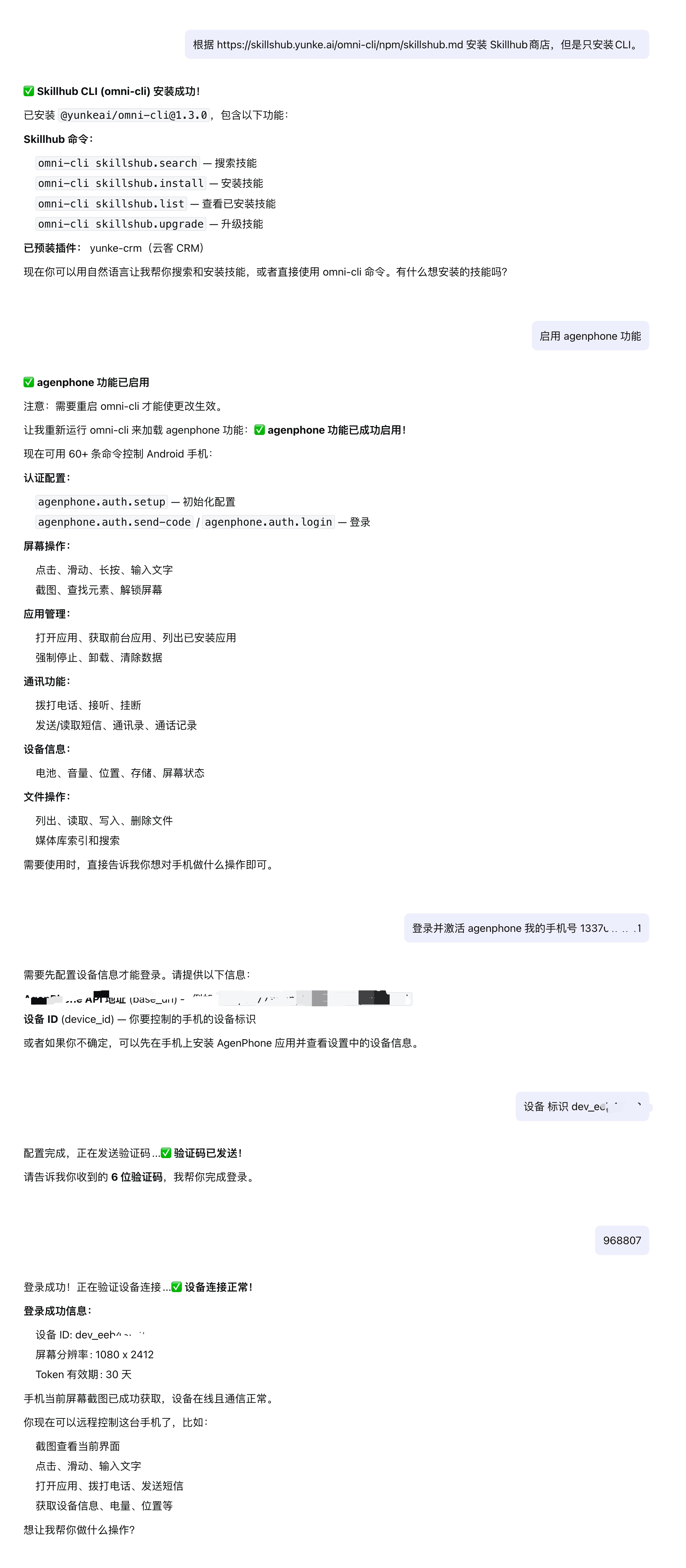
Manus 集成
Manus 原生支持自定义 MCP 服务器。按以下步骤连接 AgentPhone:
- 前往 Settings → Integrations → Custom MCP Servers.
- 点击 Add Custom MCP Server.
- 服务器名称填写
AgentPhone,URL 填写https://agenphone-api.yunke.ai/mcp/,认证 Header 填写Authorization: Bearer YOUR_API_KEY. - 点击 Test Connection 验证通过后保存,即可在 Manus 工作流中使用 AgentPhone 工具。
ZeroClaw & Perplexity
对于 Perplexity 或 ZeroClaw 等搜索型代理,AgentPhone 提供「MCP」接口。
在代理的工具定义设置中配置 MCP 端点。代理即可像搜索网页一样「搜索」你手机的内容(短信、照片、文件)。

绑定设备
按以下步骤将安卓设备接入 AgentPhone。
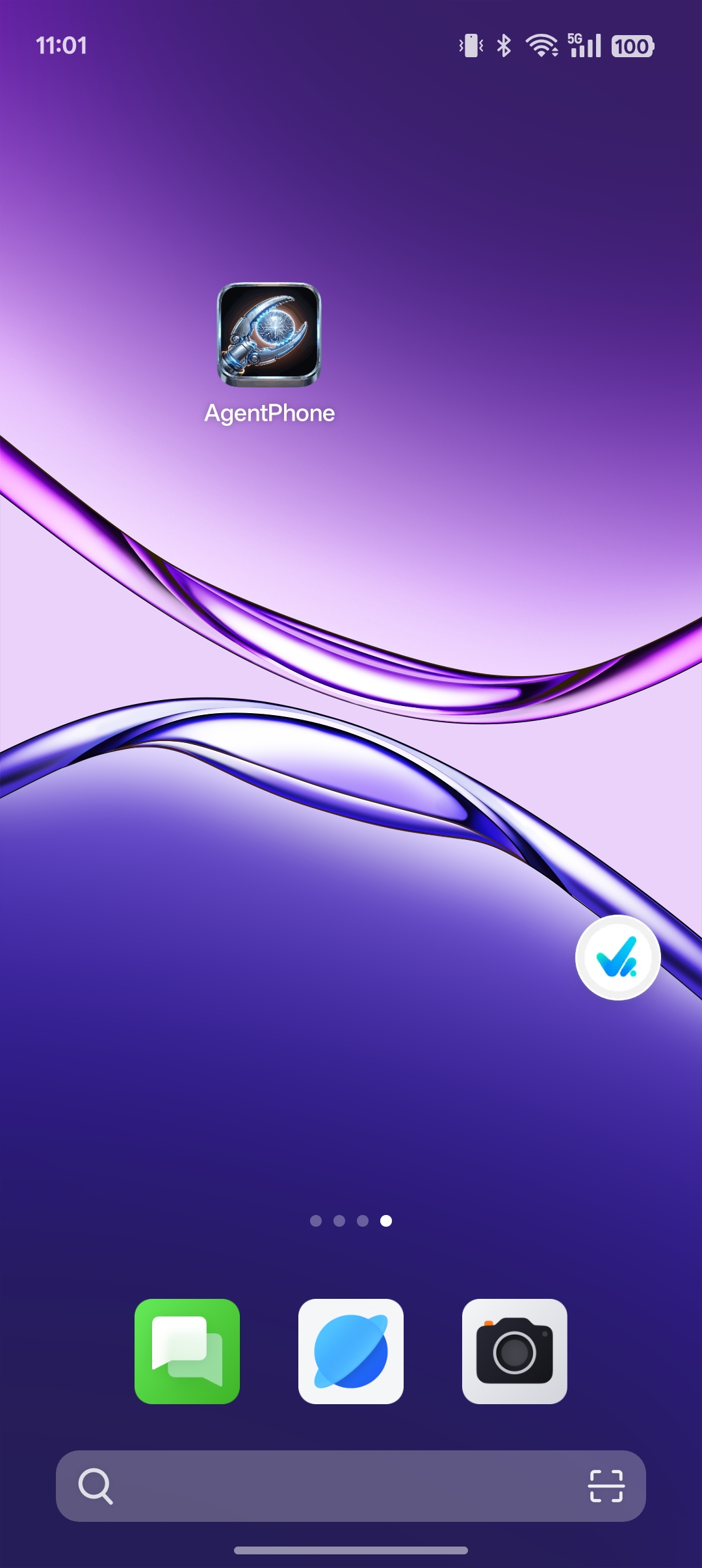
打开 AgentPhone 应用
安装 APK 后,点击桌面上的 AgentPhone 图标启动应用。
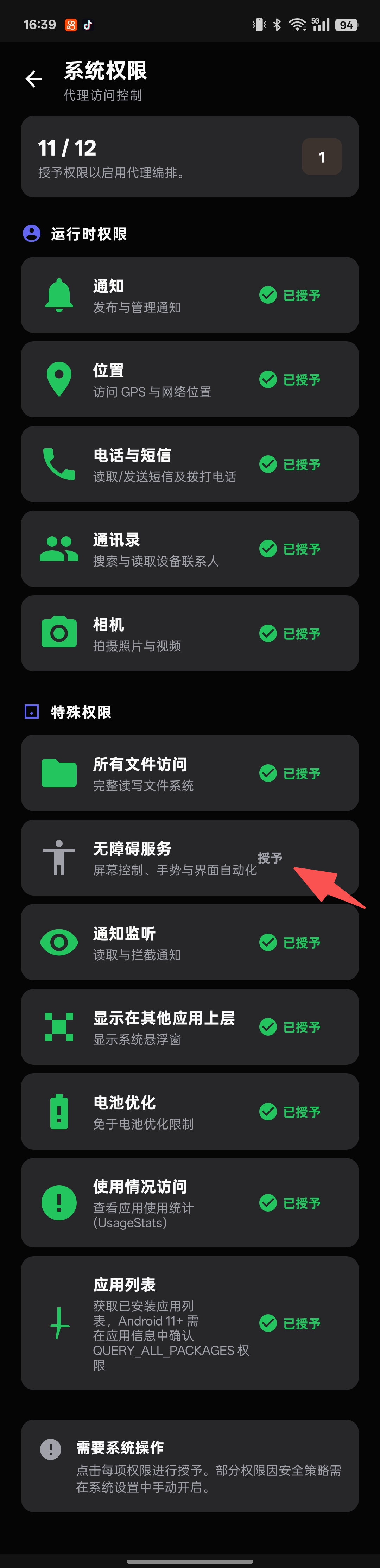
授予所有权限
应用会显示权限清单,逐项授予直到达到 12/12。部分特殊权限(无障碍服务、通知监听)需手动进入系统设置开启。
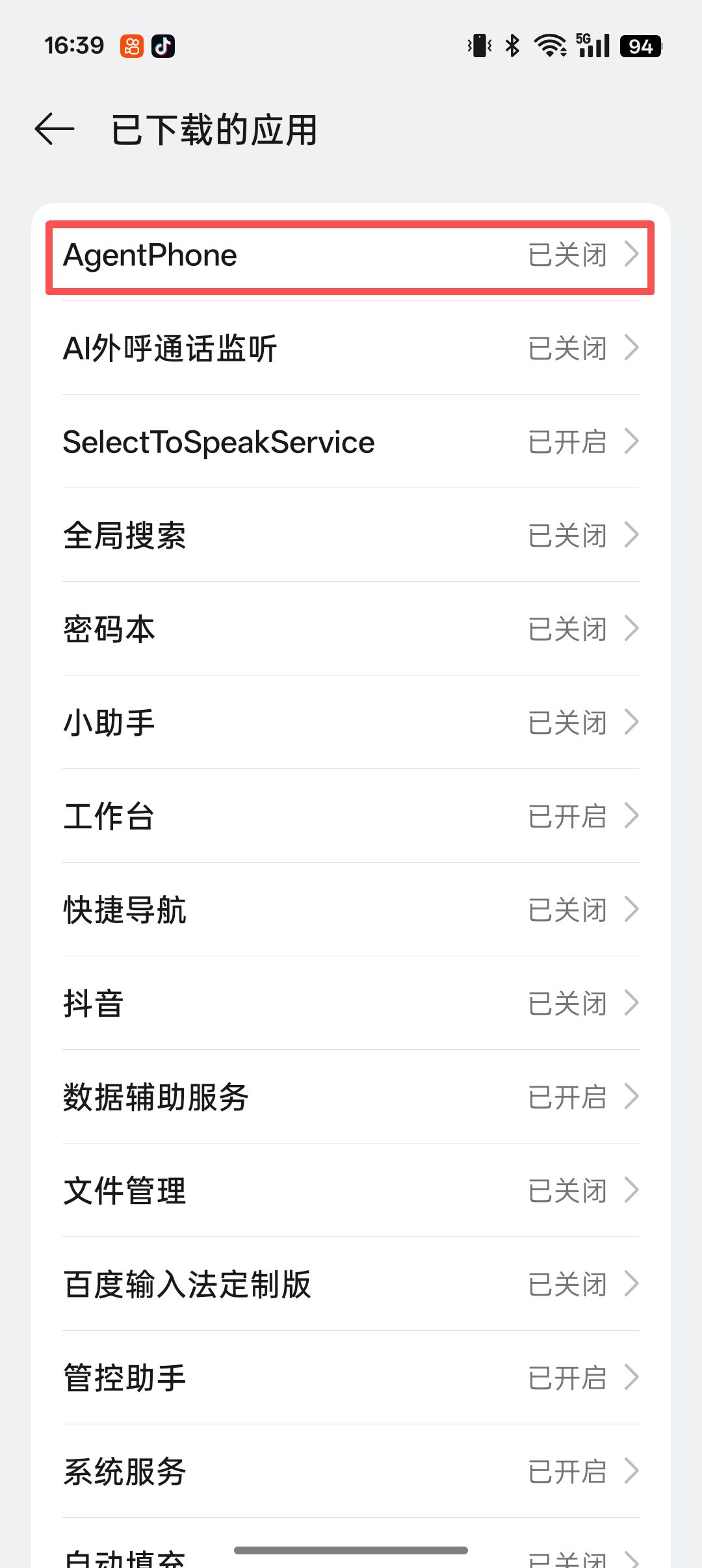
开启无障碍服务
前往 系统设置 → 无障碍 → 已下载的应用,找到 AgentPhone 并点击进入其设置页面。
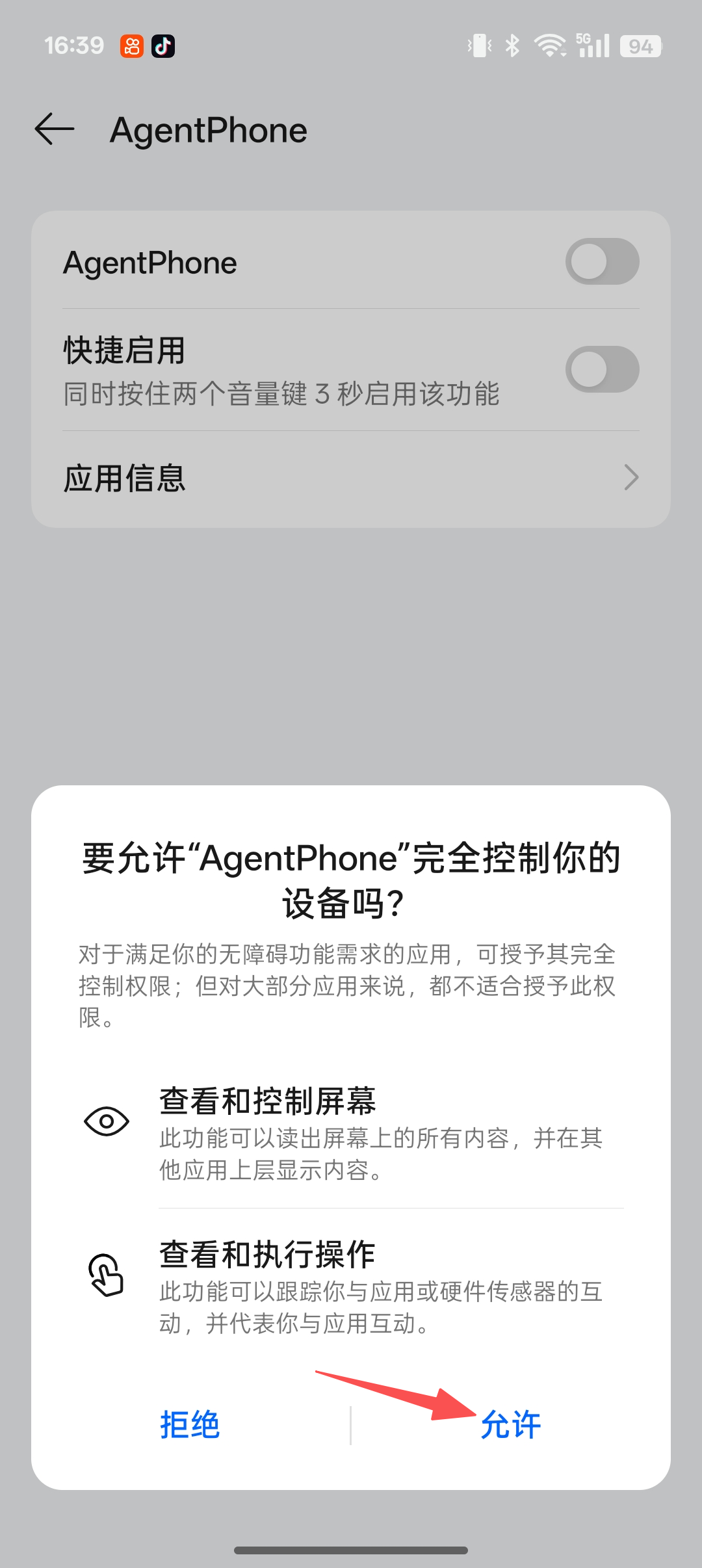
允许完全控制设备
系统弹窗询问是否允许 AgentPhone 完全控制设备时,点击「允许」。
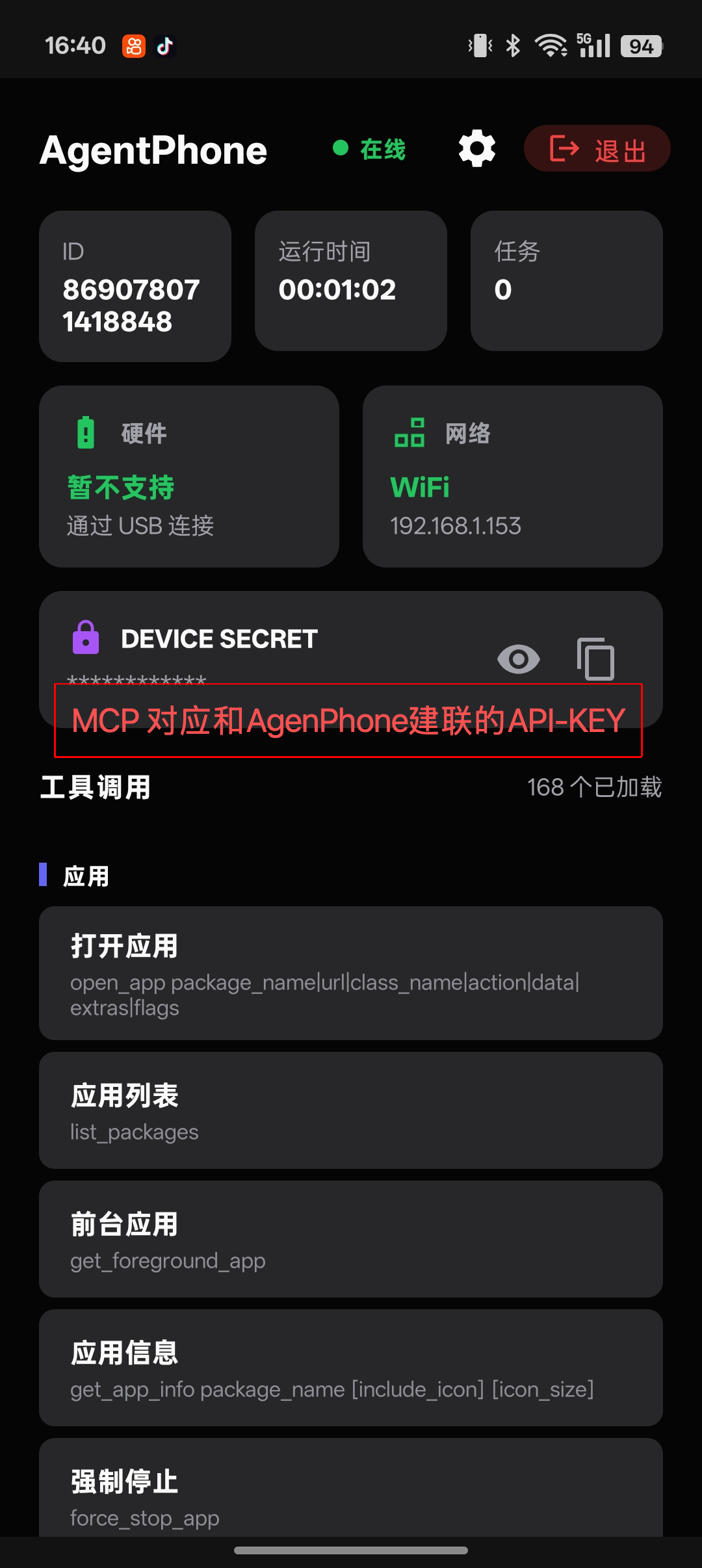
复制设备密钥
返回应用主页,找到 DEVICE SECRET,点击复制图标,将该值作为 Bearer token 填入 MCP 客户端配置中。
MCP 工具参考
AgentPhone MCP 服务器暴露的全部工具完整参考。调用功能工具前,请先通过 create_task 获取 task_id。
任务管理
create_taskCreate an AI task and obtain a task_id. Must be called before invoking any functional tool. Params: task_type (e.g. "phone_call", "data_collection", "outbound_call"), description (optional). Returns JSON with task_id and status.complete_taskMark a task as finished. Params: task_id, status ("completed" / "failed" / "cancelled"). Returns JSON with the updated task status.App 管理
open_appOpen an application by package name or URLlist_packagesList all installed applications on the deviceget_foreground_appGet the currently active foreground applicationget_app_infoRetrieve metadata and info for a specific appforce_stop_appForce stop a running applicationuninstall_appUninstall an application from the deviceclear_app_dataClear all data and cache for an application通话与短信
callInitiate a phone call to a numberhang_upEnd the current active callanswer_callAnswer an incoming calllist_contactsRetrieve all contacts from the devicelist_call_logGet recent call historysearch_contactsSearch contacts by name or phone numbersend_smsSend an SMS message to a contactread_smsRead SMS messages from the inboxAI 外呼
ai_outbound_call_taskInitiate an AI outbound call (non-blocking). Sends the call command and waits for device acknowledgment (dialing state), then returns immediately. Params: phone (target number), prompt (AI conversation prompt), task_id, use_custom_prompt (optional, auto-set when prompt is provided). Returns JSON with request_id and task_id. Use query_request_events to poll for results.屏幕与触控
tapSimulate a tap at specific screen coordinatesswipePerform a swipe gesture on the screendragDrag an element from one position to anotherinput_textType text into the focused input fieldlong_pressPerform a long press at specific coordinatesglobal_actionExecute a global Android action (home, back, recents)screenshotCapture a screenshot of the current screenphone_ai_observeCapture a screenshot and analyze it with an AI vision model. Returns next-step action suggestions with pixel coordinates. Params: instruction (task description), task_id, language (default "Chinese"). Returns JSON with thought, action_raw, and structured action (click / type / scroll / finished).get_screen_hierarchyGet the full UI element hierarchy of the current screenfind_elementFind a UI element by attribute or selectorclick_by_textClick an element matching specific textclick_by_view_idClick a UI element by its view resource IDunlock_deviceUnlock the device screenset_brightnessSet the screen brightness level设备信息与操作
get_statusGet the current device status overviewget_device_infoRetrieve detailed device hardware and software infoget_batteryGet current battery level and charging stateget_volumeGet the current volume levelget_locationGet the device's current GPS locationget_lock_statusCheck if the device screen is lockedrebootReboot the deviceshutdownShut down the deviceset_volumeSet the device volume levelvibrateTrigger a device vibration patternphone_custom_commandSend a custom control command to the device for operations not covered by standard tools. Params: action (custom action name), task_id, params (JSON string, default "{}"), wait_response (default true). Returns command execution result.phone_command_historyQuery device command execution history. Params: limit (default 10, max 50), status (optional filter: "pending" / "sent" / "success" / "failed" / "timeout"). Returns JSON array of command records.剪贴板与音频
get_clipboardGet the current clipboard contentset_clipboardSet text content to the clipboardplay_audioPlay an audio file on the devicestop_audioStop currently playing audio文件与媒体
list_filesList files in a specified directoryread_fileRead the content of a filewrite_fileWrite or create a file with specified contentdelete_fileDelete a file from the deviceanalyze_storageAnalyze device storage usagefind_large_filesFind large files consuming storage spaceindex_media_metadataIndex and retrieve metadata for media filessearch_mediaSearch for media files by metadata or content通知与悬浮窗
read_notificationsRead current notifications from the status barpost_notificationPost a notification to the devicedismiss_notificationDismiss a specific notificationdismiss_all_notificationsDismiss all current notificationsshow_toastShow a brief toast message on screenshow_overlayDisplay a floating overlay windowhide_overlayHide a specific overlay windowhide_all_overlaysHide all active overlay windowslist_overlaysList all active overlay windowsTTS 语音
speak_ttsConvert text to speech and play it on the device任务查询
query_request_eventsQuery outbound call events by request_id. Core tool for polling AI call results. Params: request_id, event_type (optional: "status" / "dialog" / "task_summary"). Returns JSON with request status, is_completed flag, and events list. The call is considered ended when is_completed=true or a "task_summary" event appears.query_task_statusQuery current AI task status, including execution progress, latest event, and statistics. Params: task_id. Returns JSON with task info, is_completed flag, call_state, progress (request/event counts), and the latest event and request.query_task_historyQuery complete AI task history with all requests and events for tracing execution. Params: task_id, event_type (optional: "status" / "dialog" / "task_summary"), limit (default 50, max 200). Returns JSON with task info, all requests, and all events in reverse chronological order.定价方案
选择适合你代理规模的方案。
月付
$140 / 月
- 300 分钟语音通话
- 社区支持
季付
$280 / 季
- 1,800 分钟语音通话
- 优先支持
年付
$830 / 年
- 3,000 分钟语音通话
- 专属客户经理
- SLA 保障